
Schengen day tracker
Know your Schengen days before you book.
Add your past stays and review the recorded days in your rolling 180-day window. With Pro, keep future country days current automatically and see which dates still need review.
 Manual tracking for 2 countries is free. Automatic tracking with Pro.
  Scan with your iPhone
 Free manual tracking for 2 countries · Automatic tracking with Pro · iOS 16+
Last reviewed · Informational only, not tax or legal advice
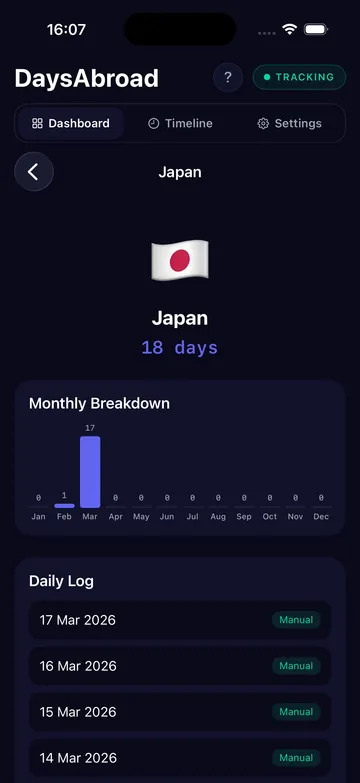
See the record behind the number
Start with your stays. Keep the next days current.
Open a country to see its monthly breakdown and individual days. Add previous trips and correct missing dates instead of relying on memory.
- Add your past trips. Manual tracking for two countries is free.
- Review your record. Check the dates you have entered. Pro’s Schengen dashboard shows recorded days and dates that need review.
- Let Pro keep counting. Enable location tracking for future days, keep multi-year history, and export CSV or JSON.
Already traveled this year? Add past stays first. Installing the app does not reconstruct earlier trips automatically.
Keep the count in perspective
Know which dates are in your record.
- Schengen does not reset on January 1.
- Entry and exit days both count.
- The 180-day window moves every day.
- Repeat trips make spreadsheet formulas fragile.
Why it matters
The mistake is usually accidental.
Most travelers do not plan to overstay. They lose track of earlier trips, count countries separately, or assume the window resets after leaving Europe.
- Short trips across multiple Schengen countries add together.
- A heavy spring can reduce a summer allowance.
- Manual logs drift when travel gets frequent.
How DaysAbroad helps
Use the calculator once. Let the app keep counting.
The free calculator checks trips you enter manually. DaysAbroad keeps the count updated from your phone location and gives you a day-by-country history when you need proof.
Records and export
When someone asks where you were, have the file ready.
DaysAbroad keeps a country-by-country timeline you can export for accountants, visa paperwork, employer reporting, advisor review, or your own archive.
- Rolling 90/180 count
- Recorded days and missing-date coverage
- Manual corrections for missed days
- CSV and JSON export
- Local records with optional iCloud backup
Read next
Keep going with the matching guide or tool.
FAQ
Common questions
- Does Schengen reset after I leave?
- No. The rule looks back over the previous 180 days from each day you are in Schengen. Leaving stops new days from being added, but old days only fall out as the window moves.
- Do entry and exit days count?
- Yes. Arrival and departure days count as full Schengen days for short stays.
- Does DaysAbroad replace official border records?
- No. DaysAbroad gives you your own record, but official records and authorities still decide your status.
- Can I edit trips manually?
- Yes. DaysAbroad supports manual corrections for missed location data, dead batteries, land borders, or other edge cases.
- Does this work offline?
- The app keeps its day log on device and can reconcile location history when data is available again.
Get DaysAbroad
Start this year's record before it becomes reconstruction work.
Free for two countries. Pro unlocks automatic tracking, the Schengen dashboard, multi-year history, purpose labels, and CSV/JSON export.
DaysAbroad helps you keep day-count records. It is not legal, tax, or immigration advice. Always confirm your specific situation with an immigration lawyer, tax advisor, accountant, or the relevant authority.